Web search?1
Revised
You can use Ollama's web search API to augment models with the latest information, to reduce hallucinations and improve accuracy.1?2
Web search is a REST API, with deeper tool integrations in the Python and JavaScript libraries. With it, models such as OpenAI’s gpt-oss models can conduct long-running research tasks.2?3
Authentication
To use Ollama's web search API, create an API key. You need a free Ollama account.3
Web search API
Performs a web search for a single query and returns relevant results.
Request
POST https://ollama.com/api/web_search4
| Parameter | Type | Required | Default | Description |
|---|---|---|---|---|
query |
string | Yes | None | The search query string. |
max_results |
integer | No | 5 | The maximum number of results to return. The maximum value is 10. |
Response
Returns an object with one field, results. Each item in results is a search result object.5
| Field | Type | Description |
|---|---|---|
results |
array | The search result objects. |
results[].title |
string | The title of the webpage. |
results[].url |
string | The URL of the webpage. |
results[].content |
string | A relevant content snippet from the webpage. |
Examples
Note: Set
OLLAMA_API_KEY, or pass the key in theAuthorizationheader.6
cURL request7?4
curl https://ollama.com/api/web_search \
  --header "Authorization: Bearer $OLLAMA_API_KEY" \
	-d '{
	  "query":"what is ollama?"
	}'
Response
{
  "results": [
    {
      "title": "Ollama",
      "url": "https://ollama.com/",
      "content": "Cloud models are now available..."
    },
    {
      "title": "What is Ollama? Introduction to the AI model management tool",
      "url": "https://www.hostinger.com/tutorials/what-is-ollama",
      "content": "Ariffud M. 6min Read..."
    },
    {
      "title": "Ollama Explained: Transforming AI Accessibility and Language ...",
      "url": "https://www.geeksforgeeks.org/artificial-intelligence/ollama-explained-transforming-ai-accessibility-and-language-processing/",
      "content": "Data Science Data Science Projects Data Analysis..."
    }
  ]
}
Python library
import ollama
response = ollama.web_search("What is Ollama?")
print(response)
Example output
results = [
    {
        "title": "Ollama",
        "url": "https://ollama.com/",
        "content": "Cloud models are now available in Ollama..."
    },
    {
        "title": "What is Ollama? Features, Pricing, and Use Cases - Walturn",
        "url": "https://www.walturn.com/insights/what-is-ollama-features-pricing-and-use-cases",
        "content": "Our services..."
    },
    {
        "title": "Complete Ollama Guide: Installation, Usage & Code Examples",
        "url": "https://collabnix.com/complete-ollama-guide-installation-usage-code-examples",
        "content": "Join our Discord Server..."
    }
]
For more, see the Python web search example.8
JavaScript library9
import { Ollama } from "ollama";

const client = new Ollama();
const results = await client.webSearch("what is ollama?");
console.log(JSON.stringify(results, null, 2));
Example output
{
  "results": [
    {
      "title": "Ollama",
      "url": "https://ollama.com/",
      "content": "Cloud models are now available..."
    },
    {
      "title": "What is Ollama? Introduction to the AI model management tool",
      "url": "https://www.hostinger.com/tutorials/what-is-ollama",
      "content": "Ollama is an open-source tool..."
    },
    {
      "title": "Ollama Explained: Transforming AI Accessibility and Language Processing",
      "url": "https://www.geeksforgeeks.org/artificial-intelligence/ollama-explained-transforming-ai-accessibility-and-language-processing/",
      "content": "Ollama is a groundbreaking..."
    }
  ]
}
For more, see the JavaScript web search example.10
Web fetch API
Fetches a single webpage by URL and returns its content.11
Request
POST https://ollama.com/api/web_fetch12
| Parameter | Type | Required | Default | Description |
|---|---|---|---|---|
url |
string | Yes | None | The URL to fetch. |
Response
Returns an object with these fields.13
| Field | Type | Description |
|---|---|---|
title |
string | The title of the webpage. |
content |
string | The main content of the webpage. |
links |
array | The links found on the page. |
Examples
cURL request14?515
curl --request POST \
  --url https://ollama.com/api/web_fetch \
  --header "Authorization: Bearer $OLLAMA_API_KEY" \
  --header 'Content-Type: application/json' \
  --data '{
      "url": "ollama.com"
  }'
Response?6
{
  "title": "Ollama",
  "content": "[Cloud models](https://ollama.com/blog/cloud-models) are now available in Ollama...",
  "links": [
    "http://ollama.com/",
    "http://ollama.com/models",
    "https://github.com/ollama/ollama"
  ]
Python SDK
from ollama import web_fetch

result = web_fetch('https://ollama.com')
print(result)
Result16
WebFetchResponse(
    title='Ollama',
    content='[Cloud models](https://ollama.com/blog/cloud-models) are now available in Ollama\n\n**Chat & build
with open models**\n\n[Download](https://ollama.com/download) [Explore
models](https://ollama.com/models)\n\nAvailable for macOS, Windows, and Linux',
    links=['https://ollama.com/', 'https://ollama.com/models', 'https://github.com/ollama/ollama']
)
JavaScript SDK
import { Ollama } from "ollama";

const client = new Ollama();
const fetchResult = await client.webFetch("https://ollama.com");
console.log(JSON.stringify(fetchResult, null, 2));
Result
{
  "title": "Ollama",
  "content": "[Cloud models](https://ollama.com/blog/cloud-models) are now available in Ollama...",
  "links": [
    "https://ollama.com/",
    "https://ollama.com/models",
    "https://github.com/ollama/ollama"
  ]
}
Building a search agent
This example builds a small search agent that uses Ollama’s web search and web fetch APIs as tools. It uses Alibaba’s Qwen 3 model with 4B parameters.17
Pull the model.18
ollama pull qwen3:4b
Run the following script.19
from ollama import chat, web_fetch, web_search

available_tools = {'web_search': web_search, 'web_fetch': web_fetch}

messages = [{'role': 'user', 'content': "what is ollama's new engine"}]

while True:
  response = chat(
    model='qwen3:4b',
    messages=messages,
    tools=[web_search, web_fetch],
    think=True
    )
  if response.message.thinking:
    print('Thinking: ', response.message.thinking)
  if response.message.content:
    print('Content: ', response.message.content)
  messages.append(response.message)
  if response.message.tool_calls:
    print('Tool calls: ', response.message.tool_calls)
    for tool_call in response.message.tool_calls:
      function_to_call = available_tools.get(tool_call.function.name)
      if function_to_call:
        args = tool_call.function.arguments
        result = function_to_call(**args)
        print('Result: ', str(result)[:200]+'...')
        # Result is truncated for limited context lengths
        messages.append({'role': 'tool', 'content': str(result)[:2000 * 4], 'tool_name': tool_call.function.name})
      else:
        messages.append({'role': 'tool', 'content': f'Tool {tool_call.function.name} not found', 'tool_name': tool_call.function.name})
  else:
    break
The script prints the model’s thinking, each tool call, the start of each tool result, and the model’s final answer. For example:20
Result21
Thinking:  Okay, the user is asking about Ollama's new engine. I need to figure out what they're referring to. Ollama is a company that develops large language models, so maybe they've released a new model or an updated version of their existing engine....

Tool calls:  [ToolCall(function=Function(name='web_search', arguments={'max_results': 3, 'query': 'Ollama new engine'}))]
Result:  results=[WebSearchResult(content='# New model scheduling\n\n## September 23, 2025\n\nOllama now includes a significantly improved model scheduling system. Ahead of running a model, Ollama’s new engine

Thinking:  Okay, the user asked about Ollama's new engine. Let me look at the search results.

First result is from September 23, 2025, talking about new model scheduling. It mentions improved memory management, reduced crashes, better GPU utilization, and multi-GPU performance. Examples show speed improvements and accurate memory reporting. Supported models include gemma3, llama4, qwen3, etc...

Content:  Ollama has introduced two key updates to its engine, both released in 2025:

1. **Enhanced Model Scheduling (September 23, 2025)**
   - **Precision Memory Management**: Exact memory allocation reduces out-of-memory crashes and optimizes GPU utilization.
   - **Performance Gains**: Examples show significant speed improvements (e.g., 85.54 tokens/s vs 52.02 tokens/s) and full GPU layer utilization.
   - **Multi-GPU Support**: Improved efficiency across multiple GPUs, with accurate memory reporting via tools like `nvidia-smi`.
   - **Supported Models**: Includes `gemma3`, `llama4`, `qwen3`, `mistral-small3.2`, and more.

2. **Multimodal Engine (May 15, 2025)**
   - **Vision Support**: First-class support for vision models, including `llama4:scout` (109B parameters), `gemma3`, `qwen2.5vl`, and `mistral-small3.1`.
   - **Multimodal Tasks**: Examples include identifying animals in multiple images, answering location-based questions from videos, and document scanning.

These updates highlight Ollama's focus on efficiency, performance, and expanded capabilities for both text and vision tasks.
Context length and agents
Web search results can return thousands of tokens. Increase the context length of the model to at least ~32,000 tokens.22X11 Search agents work best with full context length. Ollama's cloud models run at the full context length.
MCP Server
You can turn on web search in any MCP client through23 the Python MCP server.
Cline
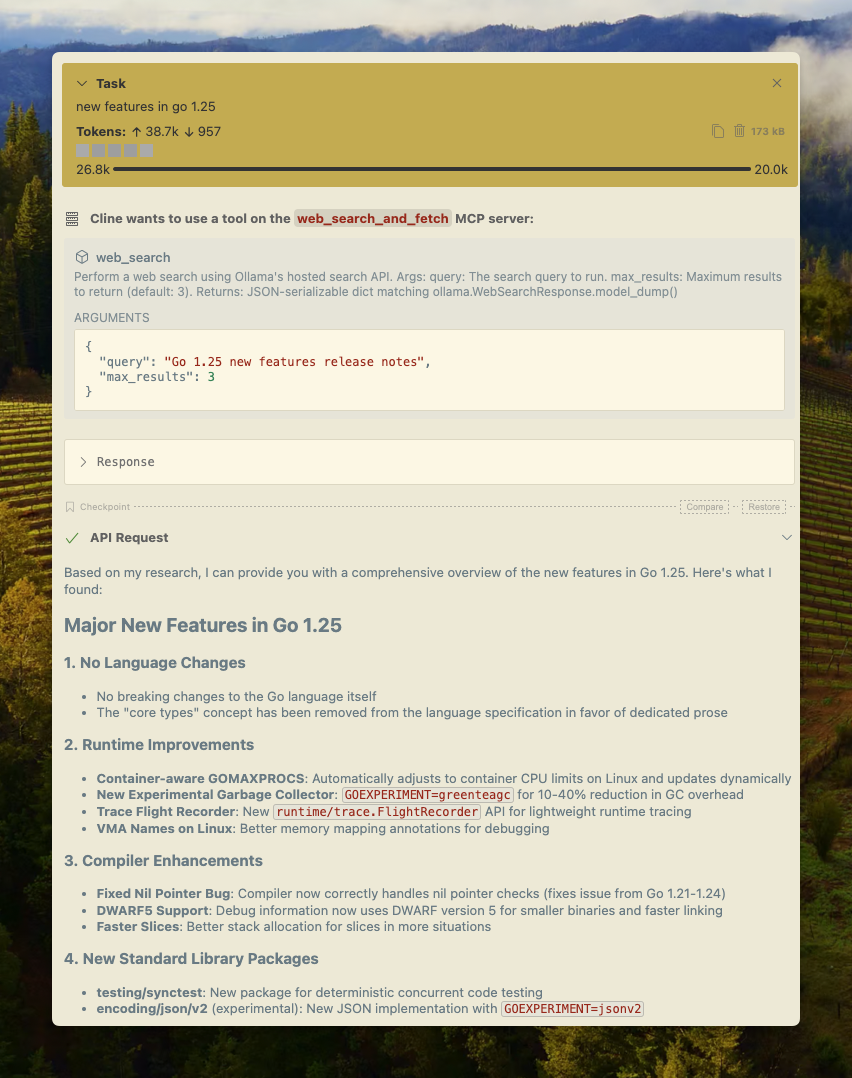
You can integrate Ollama's web search with Cline through the MCP server configuration.24
1. Open Manage MCP Servers. 2. Select Configure MCP Servers. 3. Add the following configuration.25
{
  "mcpServers": {
    "web_search_and_fetch": {
      "type": "stdio",
      "command": "uv",
      "args": ["run", "path/to/web-search-mcp.py"],
      "env": { "OLLAMA_API_KEY": "your_api_key_here" }
    }
  }
}
In the configuration, replace path/to/web-search-mcp.py with the path to the Python MCP server script, and replace your_api_key_here with your API key.26?7
Codex
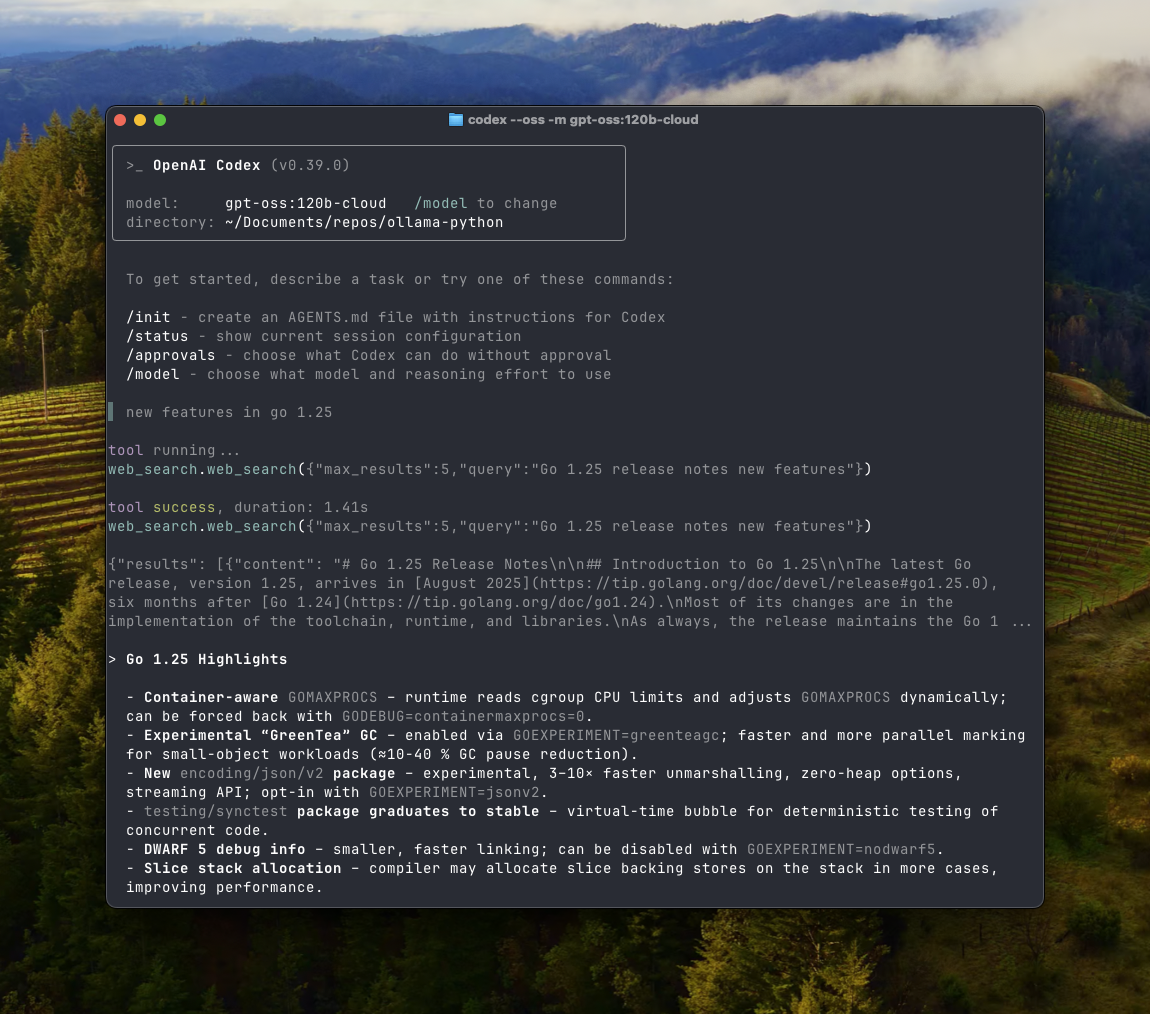
To use web search with OpenAI's Codex tool, add the following configuration to ~/.codex/config.toml.2728
[mcp_servers.web_search]
command = "uv"
args = ["run", "path/to/web-search-mcp.py"]
env = { "OLLAMA_API_KEY" = "your_api_key_here" }
Goose
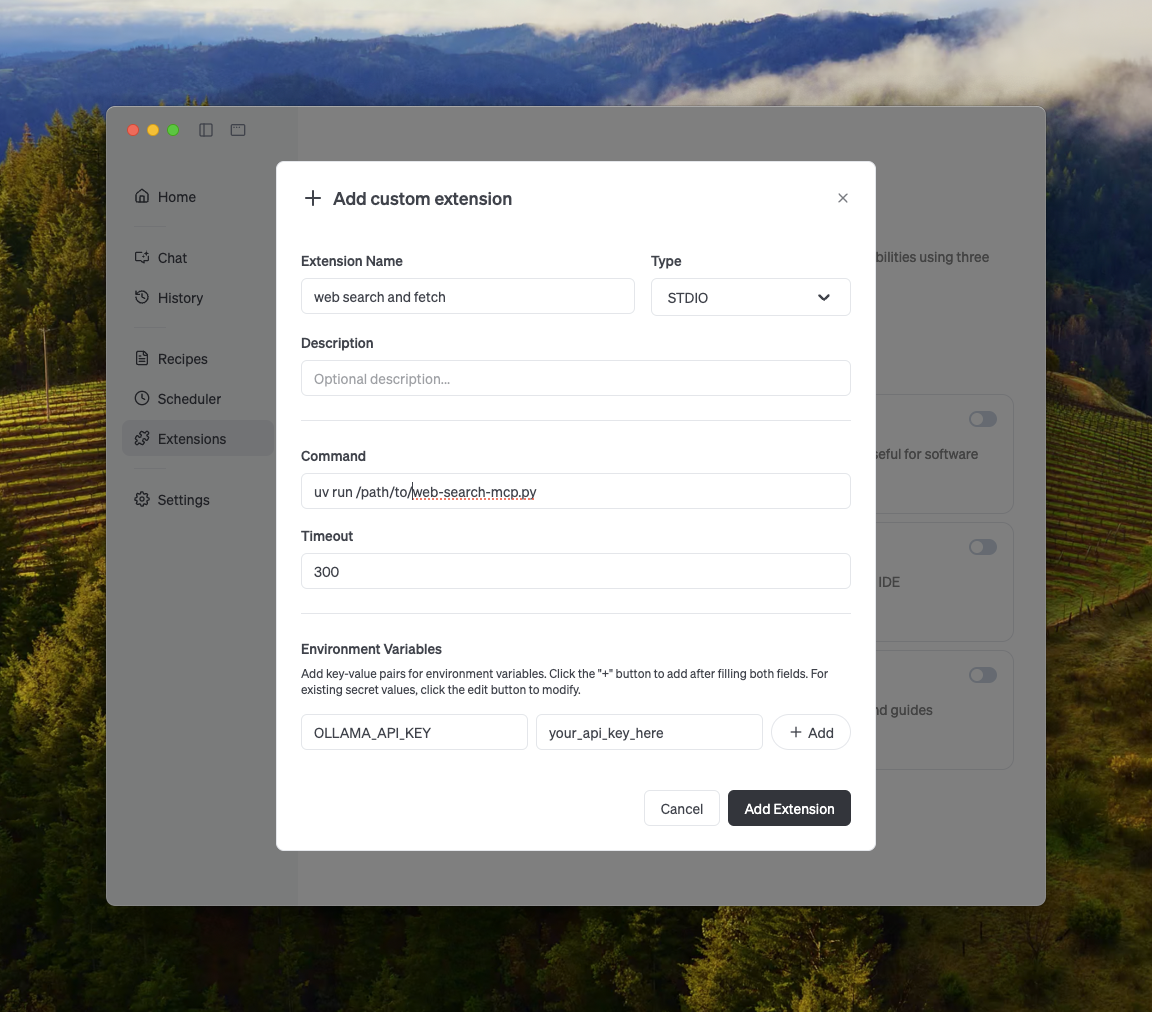
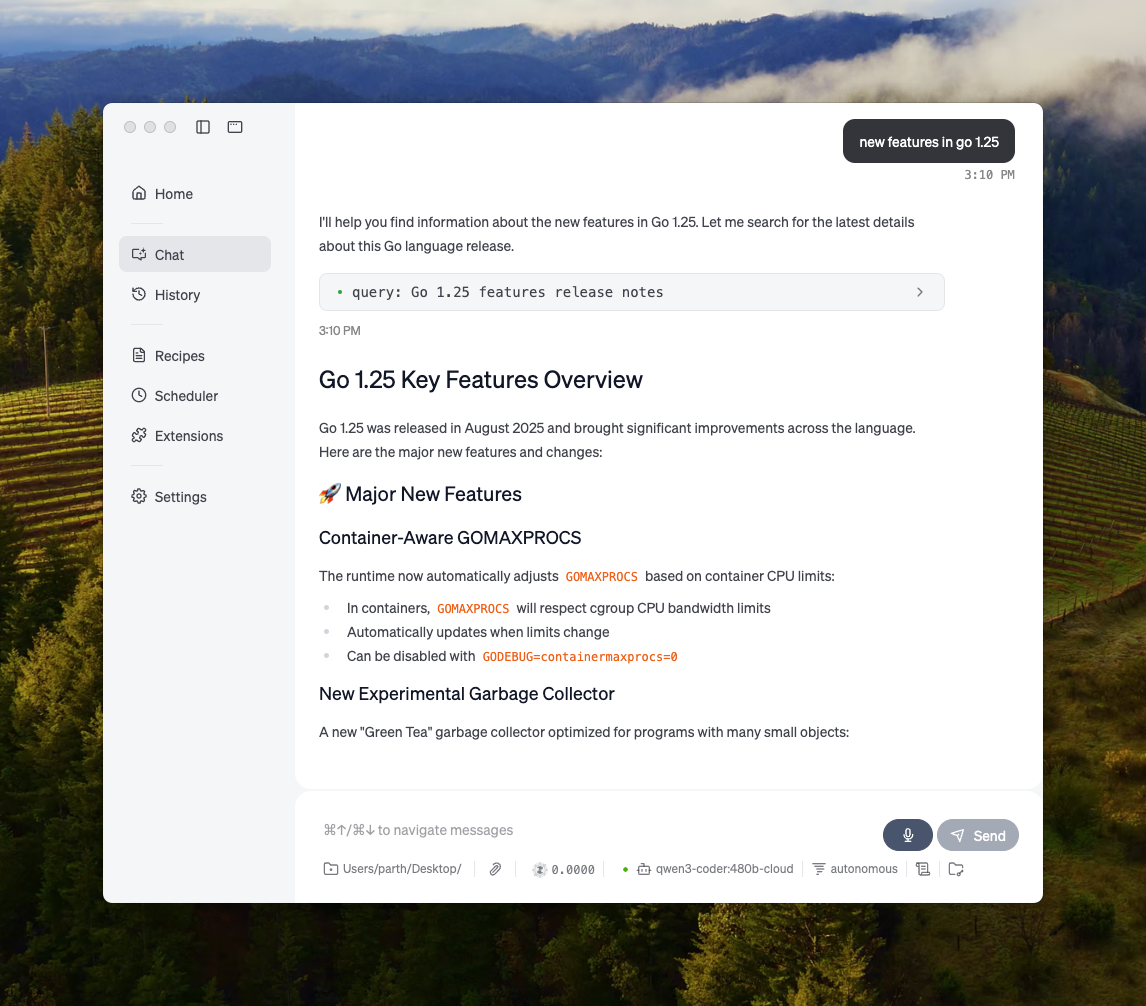
You can integrate Ollama with Goose through its MCP feature.29?8
Other integrations
You can integrate Ollama into most tools through Ollama's API, the Python or JavaScript libraries, the OpenAI-compatible API, or the MCP server.30?9
Notes on this page
1 Wording Audit: improved Active voice and addressed to the reader; the claim itself is unchanged and is queried.
Was:
Ollama's web search API can be used to augment models with the latest information to reduce hallucinations and improve accuracy.voice-second-personprin-one-idea-per-sentence2 Wording Audit: improved Names the actor and replaces “This also enables” with a clear subject.
Was:
Web search is provided as a REST API with deeper tool integrations in the Python and JavaScript libraries. This also enables models like OpenAI’s gpt-oss models to conduct long-running research tasks.voice-active-in-instructionsprin-plain-words3 Wording Audit: improved Leads with the action and states the account requirement in the active voice; the link target is unchanged.
Was:
For access to Ollama's web search API, create an API key. A free Ollama account is required.voice-second-personprin-lead-with-the-answer4 Structure Audit: regression Parameters become a table with name, type, required, default, and description for each;
queryshows “None” as its default because it is required.Was:
-query(string, required): the search query string -max_results(integer, optional): maximum results to return (default 5, max 10)type-ref-same-shapetable-header-and-unitsAuditor: The table says the required
queryparameter has a default ofNone, which can mislead readers into thinking the API supplies a default.5 Structure Audit: improved The nested list becomes a table with one row per field, and “web page” becomes “webpage”.
Was:
Returns an object containing: -results(array): array of search result objects, each containing: -title(string): the title of the web page -url(string): the URL of the web page -content(string): relevant content snippet from the web pagetype-ref-same-shapetable-header-and-unitsClosedCompounds6 Wording Audit: improved Puts the variable and header name in code font and gives two direct instructions.
Was:
Ensure OLLAMA_API_KEY is set or it must be passed in the Authorization header.code-font-scopevoice-active-in-instructions7 Wording Audit: improved Sentence-case heading.
Was:
cURL Requestcap-sentence-case-headings8 Wording Audit: improved Link text now says what the link is; the target is unchanged.
Was:
More Ollama Python examplelink-descriptive-text9 Wording Audit: improved Sentence-case heading.
Was:
JavaScript Librarycap-sentence-case-headings10 Wording Audit: improved Link text now says what the link is; the target is unchanged.
Was:
More Ollama JavaScript examplelink-descriptive-text11 Wording Audit: improved “webpage” is one word.
Was:
Fetches a single web page by URL and returns its content.ClosedCompounds12 Structure Audit: improved The parameter becomes a table row with the same columns as the search request.
Was:
-url(string, required): the URL to fetchtype-ref-same-shapetable-header-and-units13 Structure Audit: improved The list becomes a table, and “web page” becomes “webpage”.
Was:
Returns an object containing: -title(string): the title of the web page -content(string): the main content of the web page -links(array): array of links found on the pagetype-ref-same-shapetable-header-and-unitsClosedCompounds14 Wording Audit: improved Sentence-case heading.
Was:
cURL Requestcap-sentence-case-headings15 Wording Audit: improved The fence label said python for a curl command; now bash. The code is unchanged.
Was:
```python (on the cURL command)code-block-language16 Wording Audit: improved The block is printed output, not runnable Python (a string spans lines); now labeled text. The code is unchanged.
Was:
```python (on the WebFetchResponse output)code-block-language17 Wording Audit: improved States the goal as what the example builds and merges the two sentences.
Was:
Use Ollama’s web search API as a tool to build a mini search agent. This example uses Alibaba’s Qwen 3 model with 4B parameters.proc-state-goalprin-plain-words18 Structure Audit: neutral Adds a lead-in so the model pull reads as the first step. No steps are numbered, because the blocks sit outside a list.
proc-imperative19 Structure Audit: neutral Adds a lead-in for the script block as the second step.
proc-imperative20 Added Audit: improved Says what the printed output shows, drawn from the script's own print statements, so the reader can confirm it ran.
proc-verify-endcode-show-output21 Wording Audit: improved The output block had no language; now labeled text. The output is unchanged.
Was:
``` (no language, on the example result)code-block-language22 Wording Audit: improved Direct instruction instead of the passive, and a thousands separator. The 32,000 figure is kept as written and queried against the 64000 figure on other pages.
Was:
It is recommended to increase the context length of the model to at least ~32000 tokens.voice-active-in-instructionsnum-thousands-separatorsThousandsSeparators23 Wording Audit: improved The guide's term is “turn on”.
Was:
You can enable web search in any MCP client throughTurnOn24 Wording Audit: improved Removes “easily” and names who acts.
Was:
Ollama's web search can be integrated with Cline easily using the MCP server configuration.Minimizersvoice-active-in-instructions25 Structure Audit: improved The breadcrumb becomes three numbered steps, and the two interface labels are bold as the guide requires. The label spelling is kept.
Was:
Manage MCP Servers>Configure MCP Servers> Add the following configuration:proc-one-action-per-stepui-bold-labelsproc-imperative26 Added Audit: improved Says what the two placeholder-style values in the configuration stand for. The values in the code are unchanged.
code-placeholder-explained27 Removed Audit: improved Removes the unsupported claim “works well” and leads with the goal; the file path stays in code font.
Was:
Ollama works well with OpenAI's Codex tool. Add the following configuration to~/.codex/config.tomlfloor-suspect-phrasesprin-lead-with-the-answer28 Wording Audit: improved The block holds TOML, not Python; the label is now toml. The code is unchanged.
Was:
```python (on the TOML configuration)code-block-language29 Wording Audit: improved Replaces “via” with “through” and addresses the reader.
Was:
Ollama can integrate with Goose via its MCP feature.Latinvoice-second-person30 Wording Audit: improved Active voice, a parallel list of four routes, and “OpenAI-compatible” hyphenated; the claim about “most” tools is kept and queried.
Was:
Ollama can be integrated into most of the tools available either through direct integration of Ollama's API, Python / JavaScript libraries, OpenAI compatible API, and MCP server integration.voice-second-personterm-one-term-per-thingprin-plain-words
Questions for the owner
?1 This page is a reference for two APIs and also holds an agent walkthrough and three client setups; should those be separate task pages?
About: “Web search”
?2 What evidence supports “reduce hallucinations and improve accuracy”?
About: “to reduce hallucinations and improve accuracy”
?3 What evidence supports models such as gpt-oss conducting long-running research tasks with web search?
About: “can conduct long-running research tasks”
?4 The search cURL example sends a body with
-dbut noContent-Typeheader, while the fetch example sets one; is the header needed in both?About: “cURL request”
?5 The fetch cURL example passes
"url": "ollama.com"with no scheme, while the SDK examples usehttps://ollama.com; is a bare domain valid?About: “cURL request”
?6 The fetch cURL response block is missing its closing
]and}; should the code be corrected?About: “Response”
?7 The configuration uses
path/to/web-search-mcp.pyandyour_api_key_hereas placeholders; should these follow the angle-bracket form, such as<path-to-web-search-mcp.py>?About: “In the configuration, replace
path/to/web-search-mcp.py”?8 The Goose setup appears only as two screenshots with no text; can you supply the steps and values as text so they can be read, searched, and copied?
About: “You can integrate Ollama with Goose through its MCP feature.”
?9 Which tools does “most tools” cover, and can the claim be stated more exactly?
About: “You can integrate Ollama into most tools through”
X11 Recommended minimum context for agents, coding and web search. Context length and most coding integrations say 64k, while Web search says about 32000 and Cline and Roo Code say 32K for coding; the 64k note is also repeated on many integration pages. Is the recommended minimum 32k or 64k, and should integration pages link to one statement instead of repeating it?
Pages: Context length, Web search, Use Cline with Ollama, Use Roo Code with Ollama, OpenCode, Run Codex CLI with Ollama, Run Droid with Ollama
Original
Ollama's web search API can be used to augment models with the latest information to reduce hallucinations and improve accuracy.
Web search is provided as a REST API with deeper tool integrations in the Python and JavaScript libraries. This also enables models like OpenAI’s gpt-oss models to conduct long-running research tasks.
Authentication
For access to Ollama's web search API, create an API key. A free Ollama account is required.
Web search API
Performs a web search for a single query and returns relevant results.
Request
POST https://ollama.com/api/web_search
query(string, required): the search query stringmax_results(integer, optional): maximum results to return (default 5, max 10)
Response
Returns an object containing:
results(array): array of search result objects, each containing:title(string): the title of the web pageurl(string): the URL of the web pagecontent(string): relevant content snippet from the web page
Examples
Note: Ensure OLLAMA_API_KEY is set or it must be passed in the Authorization header.
cURL Request
curl https://ollama.com/api/web_search \
  --header "Authorization: Bearer $OLLAMA_API_KEY" \
	-d '{
	  "query":"what is ollama?"
	}'
Response
{
  "results": [
    {
      "title": "Ollama",
      "url": "https://ollama.com/",
      "content": "Cloud models are now available..."
    },
    {
      "title": "What is Ollama? Introduction to the AI model management tool",
      "url": "https://www.hostinger.com/tutorials/what-is-ollama",
      "content": "Ariffud M. 6min Read..."
    },
    {
      "title": "Ollama Explained: Transforming AI Accessibility and Language ...",
      "url": "https://www.geeksforgeeks.org/artificial-intelligence/ollama-explained-transforming-ai-accessibility-and-language-processing/",
      "content": "Data Science Data Science Projects Data Analysis..."
    }
  ]
}
Python library
import ollama
response = ollama.web_search("What is Ollama?")
print(response)
Example output
results = [
    {
        "title": "Ollama",
        "url": "https://ollama.com/",
        "content": "Cloud models are now available in Ollama..."
    },
    {
        "title": "What is Ollama? Features, Pricing, and Use Cases - Walturn",
        "url": "https://www.walturn.com/insights/what-is-ollama-features-pricing-and-use-cases",
        "content": "Our services..."
    },
    {
        "title": "Complete Ollama Guide: Installation, Usage & Code Examples",
        "url": "https://collabnix.com/complete-ollama-guide-installation-usage-code-examples",
        "content": "Join our Discord Server..."
    }
]
More Ollama Python example
JavaScript Library
import { Ollama } from "ollama";

const client = new Ollama();
const results = await client.webSearch("what is ollama?");
console.log(JSON.stringify(results, null, 2));
Example output
{
  "results": [
    {
      "title": "Ollama",
      "url": "https://ollama.com/",
      "content": "Cloud models are now available..."
    },
    {
      "title": "What is Ollama? Introduction to the AI model management tool",
      "url": "https://www.hostinger.com/tutorials/what-is-ollama",
      "content": "Ollama is an open-source tool..."
    },
    {
      "title": "Ollama Explained: Transforming AI Accessibility and Language Processing",
      "url": "https://www.geeksforgeeks.org/artificial-intelligence/ollama-explained-transforming-ai-accessibility-and-language-processing/",
      "content": "Ollama is a groundbreaking..."
    }
  ]
}
More Ollama JavaScript example
Web fetch API
Fetches a single web page by URL and returns its content.
Request
POST https://ollama.com/api/web_fetch
url(string, required): the URL to fetch
Response
Returns an object containing:
title(string): the title of the web pagecontent(string): the main content of the web pagelinks(array): array of links found on the page
Examples
cURL Request
curl --request POST \
  --url https://ollama.com/api/web_fetch \
  --header "Authorization: Bearer $OLLAMA_API_KEY" \
  --header 'Content-Type: application/json' \
  --data '{
      "url": "ollama.com"
  }'
Response
{
  "title": "Ollama",
  "content": "[Cloud models](https://ollama.com/blog/cloud-models) are now available in Ollama...",
  "links": [
    "http://ollama.com/",
    "http://ollama.com/models",
    "https://github.com/ollama/ollama"
  ]
Python SDK
from ollama import web_fetch

result = web_fetch('https://ollama.com')
print(result)
Result
WebFetchResponse(
    title='Ollama',
    content='[Cloud models](https://ollama.com/blog/cloud-models) are now available in Ollama\n\n**Chat & build
with open models**\n\n[Download](https://ollama.com/download) [Explore
models](https://ollama.com/models)\n\nAvailable for macOS, Windows, and Linux',
    links=['https://ollama.com/', 'https://ollama.com/models', 'https://github.com/ollama/ollama']
)
JavaScript SDK
import { Ollama } from "ollama";

const client = new Ollama();
const fetchResult = await client.webFetch("https://ollama.com");
console.log(JSON.stringify(fetchResult, null, 2));
Result
{
  "title": "Ollama",
  "content": "[Cloud models](https://ollama.com/blog/cloud-models) are now available in Ollama...",
  "links": [
    "https://ollama.com/",
    "https://ollama.com/models",
    "https://github.com/ollama/ollama"
  ]
}
Building a search agent
Use Ollama’s web search API as a tool to build a mini search agent.
This example uses Alibaba’s Qwen 3 model with 4B parameters.
ollama pull qwen3:4b
from ollama import chat, web_fetch, web_search

available_tools = {'web_search': web_search, 'web_fetch': web_fetch}

messages = [{'role': 'user', 'content': "what is ollama's new engine"}]

while True:
  response = chat(
    model='qwen3:4b',
    messages=messages,
    tools=[web_search, web_fetch],
    think=True
    )
  if response.message.thinking:
    print('Thinking: ', response.message.thinking)
  if response.message.content:
    print('Content: ', response.message.content)
  messages.append(response.message)
  if response.message.tool_calls:
    print('Tool calls: ', response.message.tool_calls)
    for tool_call in response.message.tool_calls:
      function_to_call = available_tools.get(tool_call.function.name)
      if function_to_call:
        args = tool_call.function.arguments
        result = function_to_call(**args)
        print('Result: ', str(result)[:200]+'...')
        # Result is truncated for limited context lengths
        messages.append({'role': 'tool', 'content': str(result)[:2000 * 4], 'tool_name': tool_call.function.name})
      else:
        messages.append({'role': 'tool', 'content': f'Tool {tool_call.function.name} not found', 'tool_name': tool_call.function.name})
  else:
    break
Result
Thinking:  Okay, the user is asking about Ollama's new engine. I need to figure out what they're referring to. Ollama is a company that develops large language models, so maybe they've released a new model or an updated version of their existing engine....

Tool calls:  [ToolCall(function=Function(name='web_search', arguments={'max_results': 3, 'query': 'Ollama new engine'}))]
Result:  results=[WebSearchResult(content='# New model scheduling\n\n## September 23, 2025\n\nOllama now includes a significantly improved model scheduling system. Ahead of running a model, Ollama’s new engine

Thinking:  Okay, the user asked about Ollama's new engine. Let me look at the search results.

First result is from September 23, 2025, talking about new model scheduling. It mentions improved memory management, reduced crashes, better GPU utilization, and multi-GPU performance. Examples show speed improvements and accurate memory reporting. Supported models include gemma3, llama4, qwen3, etc...

Content:  Ollama has introduced two key updates to its engine, both released in 2025:

1. **Enhanced Model Scheduling (September 23, 2025)**
   - **Precision Memory Management**: Exact memory allocation reduces out-of-memory crashes and optimizes GPU utilization.
   - **Performance Gains**: Examples show significant speed improvements (e.g., 85.54 tokens/s vs 52.02 tokens/s) and full GPU layer utilization.
   - **Multi-GPU Support**: Improved efficiency across multiple GPUs, with accurate memory reporting via tools like `nvidia-smi`.
   - **Supported Models**: Includes `gemma3`, `llama4`, `qwen3`, `mistral-small3.2`, and more.

2. **Multimodal Engine (May 15, 2025)**
   - **Vision Support**: First-class support for vision models, including `llama4:scout` (109B parameters), `gemma3`, `qwen2.5vl`, and `mistral-small3.1`.
   - **Multimodal Tasks**: Examples include identifying animals in multiple images, answering location-based questions from videos, and document scanning.

These updates highlight Ollama's focus on efficiency, performance, and expanded capabilities for both text and vision tasks.
Context length and agents
Web search results can return thousands of tokens. It is recommended to increase the context length of the model to at least ~32000 tokens. Search agents work best with full context length. Ollama's cloud models run at the full context length.
MCP Server
You can enable web search in any MCP client through the Python MCP server.
Cline
Ollama's web search can be integrated with Cline easily using the MCP server configuration.
Manage MCP Servers > Configure MCP Servers > Add the following configuration:
{
  "mcpServers": {
    "web_search_and_fetch": {
      "type": "stdio",
      "command": "uv",
      "args": ["run", "path/to/web-search-mcp.py"],
      "env": { "OLLAMA_API_KEY": "your_api_key_here" }
    }
  }
}
Codex
Ollama works well with OpenAI's Codex tool.
Add the following configuration to ~/.codex/config.toml
[mcp_servers.web_search]
command = "uv"
args = ["run", "path/to/web-search-mcp.py"]
env = { "OLLAMA_API_KEY" = "your_api_key_here" }
Goose
Ollama can integrate with Goose via its MCP feature.
Other integrations
Ollama can be integrated into most of the tools available either through direct integration of Ollama's API, Python / JavaScript libraries, OpenAI compatible API, and MCP server integration.
What Changed
The two endpoints now list their parameters and response fields in tables with the same parts for every entry (name, type, required, default, description). Prose is in the active voice and addressed to you, several link texts and headings are fixed, and the setup steps for Cline are numbered. Code is unchanged apart from four fence labels. Questions cover unsupported claims, code that looks wrong, the 32k and 64k context conflict, and a Goose setup shown only in screenshots.
Content type: reference. Most of the page lists two API endpoints with their parameters, response fields, and examples, which is reference; the agent build and the MCP setups are task-shaped sections inside it.
Automated check, original: 0 errors, 10 warnings, 1 suggestion. Revised: 0 errors, 0 warnings, 0 suggestions.
Independent audit (GPT-6): mixed. The revision improves scanability, headings, and several instructions while preserving most of the page’s meaning. It also introduces a misleading default in the API reference and leaves a required step sequence and a broken JSON example unresolved.
Regressions:
- The
queryparameter table listsNoneas its default even though the source only says the parameter is required; this adds a potentially false API detail.
What the revision missed:
- The model pull and script instructions are sequential actions, but they remain unnumbered even though the standard says to number steps and give one action per step.
- The web fetch cURL response example remains invalid JSON because its
linksarray and enclosing object have no closing brackets.
Structure (7)
- 4 Parameters become a table with name, type, required, default, and description for each;
queryshows “None” as its default because it is required. regression - 5 The nested list becomes a table with one row per field, and “web page” becomes “webpage”. improved
- 12 The parameter becomes a table row with the same columns as the search request. improved
- 13 The list becomes a table, and “web page” becomes “webpage”. improved
- 18 Adds a lead-in so the model pull reads as the first step. No steps are numbered, because the blocks sit outside a list. neutral
- 19 Adds a lead-in for the script block as the second step. neutral
- 25 The breadcrumb becomes three numbered steps, and the two interface labels are bold as the guide requires. The label spelling is kept. improved
Wording (20)
- 1 Active voice and addressed to the reader; the claim itself is unchanged and is queried. improved
- 2 Names the actor and replaces “This also enables” with a clear subject. improved
- 3 Leads with the action and states the account requirement in the active voice; the link target is unchanged. improved
- 6 Puts the variable and header name in code font and gives two direct instructions. improved
- 7 Sentence-case heading. improved
- 8 Link text now says what the link is; the target is unchanged. improved
- 9 Sentence-case heading. improved
- 10 Link text now says what the link is; the target is unchanged. improved
- 11 “webpage” is one word. improved
- 14 Sentence-case heading. improved
- 15 The fence label said python for a curl command; now bash. The code is unchanged. improved
- 16 The block is printed output, not runnable Python (a string spans lines); now labeled text. The code is unchanged. improved
- 17 States the goal as what the example builds and merges the two sentences. improved
- 21 The output block had no language; now labeled text. The output is unchanged. improved
- 22 Direct instruction instead of the passive, and a thousands separator. The 32,000 figure is kept as written and queried against the 64000 figure on other pages. improved
- 23 The guide's term is “turn on”. improved
- 24 Removes “easily” and names who acts. improved
- 28 The block holds TOML, not Python; the label is now toml. The code is unchanged. improved
- 29 Replaces “via” with “through” and addresses the reader. improved
- 30 Active voice, a parallel list of four routes, and “OpenAI-compatible” hyphenated; the claim about “most” tools is kept and queried. improved
Removed (1)
- 27 Removes the unsupported claim “works well” and leads with the goal; the file path stays in code font. improved