Use Ollama in Zed1
Revised
This page shows how to add Ollama to Zed, either through your own Ollama or through ollama.com.2
Before you begin3
Install Zed.
Connect Zed to Ollama4
In Zed, select the star icon in the bottom-right corner.5
Select Configure.6
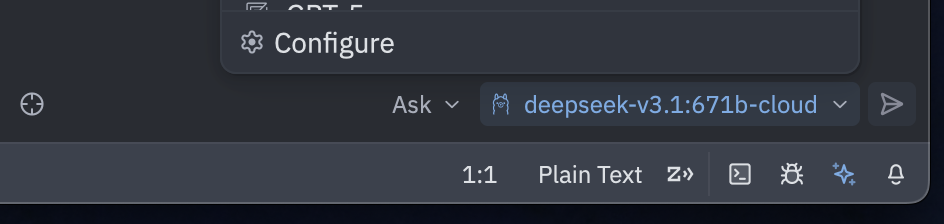
Under LLM Providers, choose Ollama.
Confirm the Host URL is
http://localhost:11434.Select Connect.7
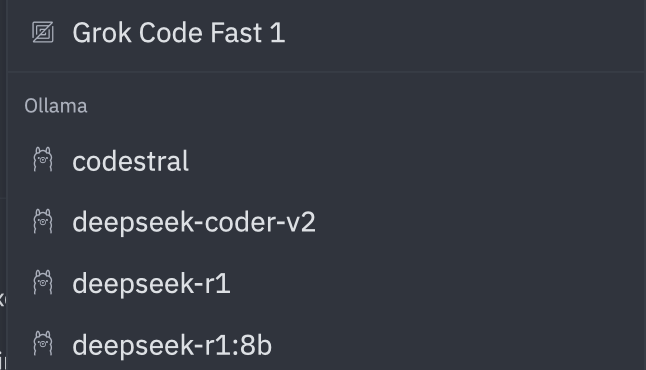
Once connected, select a model under Ollama.
Connect Zed to ollama.com9
Notes on this page
1 Wording Audit: improved A task title starts with a verb and names the result.
Was:
Zedproc-state-goalAuditor: The verb-led title says what the reader can do.
2 Added Audit: improved Added a goal sentence before the steps, using only what the page already covers.
proc-state-goalAuditor: The opening sentence previews the two connection options covered on the page.
3 Wording Audit: improved Prerequisites go under a heading that says so.
Was:
Installproc-prerequisites-firstAuditor: The prerequisite has a heading that tells readers what it contains.
4 Wording Audit: improved The heading now names the job.
Was:
Usage with Ollamatype-task-one-goalAuditor: The heading names the task instead of describing usage broadly.
5 Wording Audit: improved The step held two actions, so it is now two steps, with select instead of click.
Was:
In Zed, click the star icon in the bottom-right corner, then select Configure.SelectVerbproc-one-action-per-stepAuditor: The first action is separated into its own step and uses a clear action verb.
6 Wording Audit: improved Second action of the original step 1, now its own step.
Was:
then select Configureproc-one-action-per-stepAuditor: Configure is now a distinct step, which is easier to follow.
7 Wording Audit: improved The step held two actions, so the second is now its own step, with select instead of click.
Was:
Confirm the Host URL ishttp://localhost:11434, then click ConnectSelectVerbproc-one-action-per-stepAuditor: The Host URL check and Connect action are split into separate steps.
8 Accuracy Audit: regression The alt text on the model list image repeated the first image's text and described the wrong picture. It now describes the step the image sits under. The images are plain Markdown instead of HTML, with the same files.
Was:
Zed star icon in bottom right cornerimg-alt-requiredAuditor: The revised page leaves the ⟦q1⟧ owner-question marker visible after the image, and changing the image markup also removes the original centered half-width presentation.
9 Wording Audit: improved The heading now names the job.
Was:
Connecting to ollama.comtype-task-one-goalAuditor: The heading clearly names the ollama.com connection task.
10 Wording Audit: improved The step held two actions joined by an arrow, so it is now two steps (2 and 3).
Was:
In Zed, open the star icon → Configureproc-one-action-per-stepui-go-to-pathsAuditor: The star icon and Configure actions are separated into distinct steps.
11 Wording Audit: improved Second action of the original step 2.
Was:
→ Configureproc-one-action-per-stepAuditor: Configure is now a distinct step, which is easier to follow.
Questions for the owner
?1 What should the reader see when Zed is connected to Ollama, so the page can end with a way to confirm it worked?
About: “Once connected, select a model under Ollama”
Original
Install
Install Zed.
Usage with Ollama
- In Zed, click the star icon in the bottom-right corner, then select Configure.
- Under LLM Providers, choose Ollama
- Confirm the Host URL is
http://localhost:11434, then click Connect - Once connected, select a model under Ollama
Connecting to ollama.com
- Create an API key on ollama.com
- In Zed, open the star icon → Configure
- Under LLM Providers, select Ollama
- Set the API URL to
https://ollama.com
What Changed
The page now has a verb title, a goal sentence and a prerequisite heading. Steps hold one action each, click became select, and the images sit inside the steps they illustrate. The second image's alt text was wrong and is corrected. One question asks what confirms the connection.
Content type: task. The page gives the steps to connect Zed to Ollama.
Automated check, original: 0 errors, 3 warnings, 0 suggestions. Revised: 0 errors, 1 warnings, 0 suggestions.
Independent audit (GPT-6): mixed. The revision makes the steps easier to scan and gives the page clearer headings. It also changes image presentation and leaves a question marker in the page, so it needs cleanup before it is ready.
Regressions:
- The revision changes the images from centered, half-width HTML to plain Markdown, changing their size and alignment without noting that presentation change in the change log.
- The ⟦q1⟧ marker appears in the published page text; remove it or resolve it before publication.
What the revision missed:
- The standard says to spell out abbreviations on first use unless they are familiar to the audience; keeping “LLM Providers” is justified only if that exact UI label is necessary, as the change log notes.
- The revision does not provide a way to confirm the ollama.com connection worked; the owner question correctly flags this gap, but the marker should not remain in the page.
Wording (9)
- 1 A task title starts with a verb and names the result. improved
- 3 Prerequisites go under a heading that says so. improved
- 4 The heading now names the job. improved
- 5 The step held two actions, so it is now two steps, with select instead of click. improved
- 6 Second action of the original step 1, now its own step. improved
- 7 The step held two actions, so the second is now its own step, with select instead of click. improved
- 9 The heading now names the job. improved
- 10 The step held two actions joined by an arrow, so it is now two steps (2 and 3). improved
- 11 Second action of the original step 2. improved
Accuracy (1)
- 8 The alt text on the model list image repeated the first image's text and described the wrong picture. It now describes the step the image sits under. The images are plain Markdown instead of HTML, with the same files. regression
Added (1)
- 2 Added a goal sentence before the steps, using only what the page already covers. improved