Context length
Revised
Context length is the maximum number of tokens that the model has access to in memory.?1
Ollama defaults to the following context lengths based on video memory (VRAM):1
Set the context length to at least 64,000 tokens for tasks that need a large context, such as web search, agents, and coding tools.3X11
Setting context length
A larger context length needs more memory to run a model. Make sure you have enough VRAM available before you increase it.4
Cloud models are set to their maximum context length by default.
App
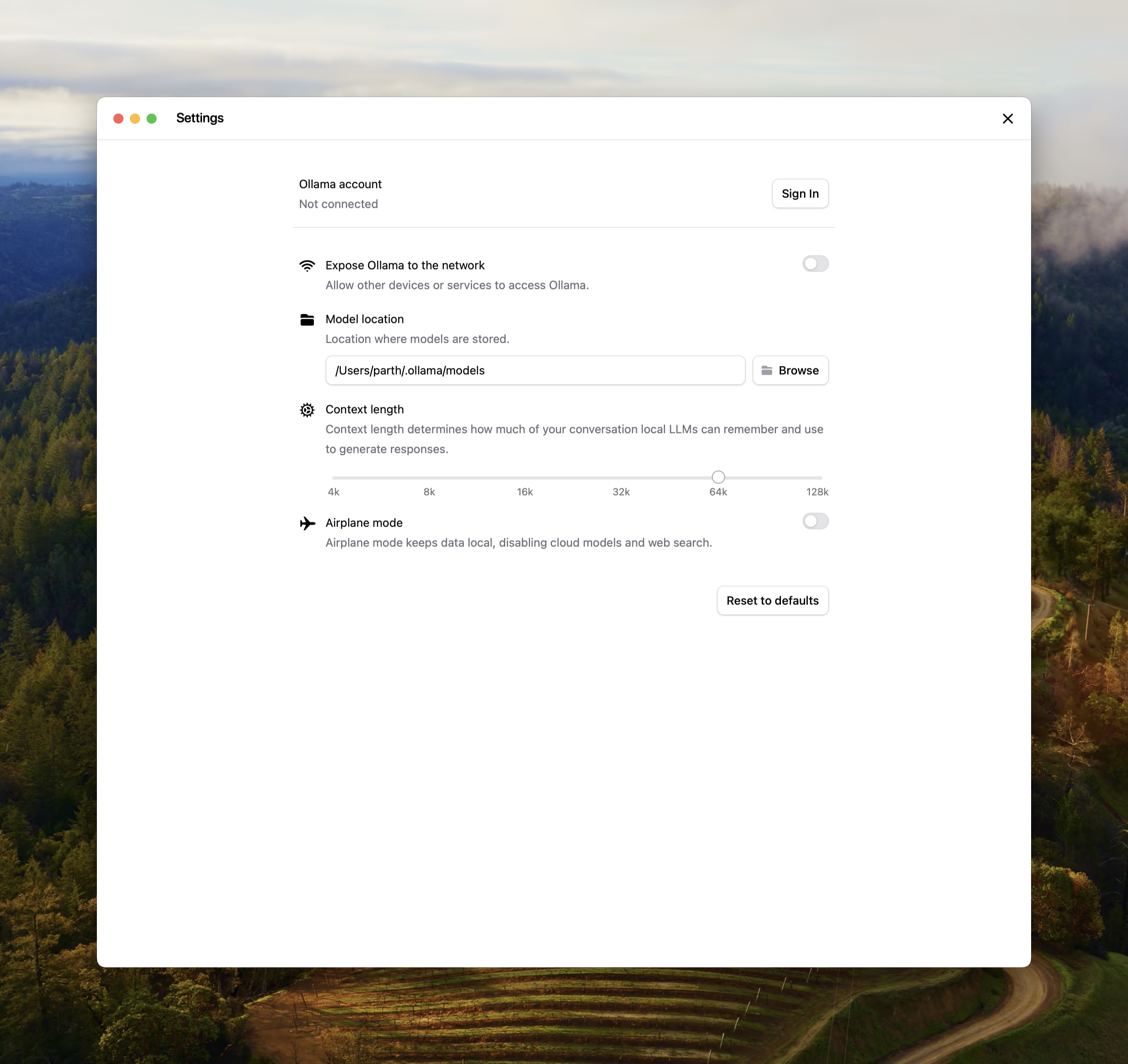
In the Ollama app, move the slider under settings to the context length you want.5
CLI
If you can't edit the context length in Ollama, you can also set it when you start the server:67X21
OLLAMA_CONTEXT_LENGTH=64000 ollama serve
Check allocated context length and model offloading
For best performance, use the model's maximum context length and avoid offloading the model to the CPU. To verify the split, run ollama ps and read the PROCESSOR column.8X44
ollama ps
NAME             ID              SIZE      PROCESSOR    CONTEXT    UNTIL
gemma4:latest    c6eb396dbd59    9.6 GB    100% GPU     131072     2 minutes from now
Notes on this page
1 Structure Audit: improved The defaults are the page's core content, so they are now body text instead of a callout, and VRAM is spelled out at first use.
Was:
> Note: Ollama defaults to the following context lengths based on VRAM:SpellOutFirsttype-one-per-pageAuditor: Moving the default values into the body gives this central information more prominence and spells out VRAM at first use.
2 Wording Audit: improved A numeric range takes an en dash.
Was:
24-48punct-en-dash-rangenum-rangesAuditor: The en dash makes the numeric range easier to read and follows the standard’s range convention.
3 Wording Audit: improved The sentence now starts with the action, speaks to the reader, and writes 64,000 with a separator. The recommended value is unchanged.
Was:
Tasks which require large context like web search, agents, and coding tools should be set to at least 64000 tokens.ThousandsSeparatorsvoice-second-personprin-lead-with-the-answerAuditor: The sentence leads with the action and uses a thousands separator without changing the recommended value.
4 Wording Audit: improved Present tense and shorter wording, with the same two facts.
Was:
Setting a larger context length will increase the amount of memory required to run a model. Ensure you have enough VRAM available to increase the context length.voice-present-tenseprin-plain-wordsAuditor: The shorter present-tense wording keeps both points and is easier to read.
5 Wording Audit: improved The step now names where the reader acts, then the action.
Was:
Change the slider in the Ollama app under settings to your desired context length.proc-imperativevoice-second-personAuditor: The instruction addresses the reader directly and keeps the same slider action and location.
6 Wording Audit: improved The passive sentence is now an active instruction that leads into the command.
Was:
If editing the context length for Ollama is not possible, the context length can also be updated when serving Ollama.voice-second-personvoice-active-in-instructionslist-lead-inAuditor: The active instruction leads into the command and preserves the server-setting method.
7 Wording Audit: improved The three unlabeled code blocks are now labeled shell or text. Their contents are unchanged.
Was:
Code fences with no language labelcode-block-languageAuditor: Language labels clarify the code blocks, and their contents remain unchanged.
8 Wording Audit: improved The check is now a step that names the command first and the column to read.
Was:
For best performance, use the maximum context length for a model, and avoid offloading the model to CPU. Verify the split underPROCESSORusingollama ps.voice-active-in-instructionscode-font-scopeAuditor: The revised sentence makes the verification steps more explicit while preserving the performance guidance.
Questions for the owner
?1 This page defines context length, lists defaults, and gives steps to change it; should the explanation and the steps be separate pages?
About: “Context length is the maximum number of tokens that the model has access to in memory.”
?2 The ranges 24-48 GiB and >= 48 GiB both include 48 GiB; which default applies at exactly 48 GiB?
About: “24-48 GiB VRAM: 32k context”
X1 Default context length stated three ways. The FAQ gives a flat 4096-token default, the Context length page gives a VRAM-based default, and the Modelfile reference gives 2048 for num_ctx. What is the current default context length, and should the FAQ and Modelfile reference defer to the Context length page?
Pages: Local FAQ, Context length, Modelfile reference
X11 Recommended minimum context for agents, coding and web search. Context length and most coding integrations say 64k, while Web search says about 32000 and Cline and Roo Code say 32K for coding; the 64k note is also repeated on many integration pages. Is the recommended minimum 32k or 64k, and should integration pages link to one statement instead of repeating it?
Pages: Context length, Web search, Use Cline with Ollama, Use Roo Code with Ollama, OpenCode, Run Codex CLI with Ollama, Run Droid with Ollama
X21 OpenAI compatibility gives only the Modelfile route for context size. OpenAI compatibility says changing context size needs a new Modelfile, while the FAQ and Context length page document the OLLAMA_CONTEXT_LENGTH server setting and the app slider. Should the OpenAI compatibility page mention OLLAMA_CONTEXT_LENGTH and the app setting as alternatives?
Pages: OpenAI compatibility, Context length, Local FAQ
X44
ollama pssample output differs. The FAQ and Context length page both showollama psoutput; the FAQ's sample lacks the CONTEXT column. Should the FAQ sample be updated to the current column set?Pages: Local FAQ, Context length
Original
Context length is the maximum number of tokens that the model has access to in memory.
Note: Ollama defaults to the following context lengths based on VRAM:
- < 24 GiB VRAM: 4k context
- 24-48 GiB VRAM: 32k context
- >= 48 GiB VRAM: 256k context
Tasks which require large context like web search, agents, and coding tools should be set to at least 64000 tokens.
Setting context length
Setting a larger context length will increase the amount of memory required to run a model. Ensure you have enough VRAM available to increase the context length.
Cloud models are set to their maximum context length by default.
App
Change the slider in the Ollama app under settings to your desired context length.
CLI
If editing the context length for Ollama is not possible, the context length can also be updated when serving Ollama.
OLLAMA_CONTEXT_LENGTH=64000 ollama serve
Check allocated context length and model offloading
For best performance, use the maximum context length for a model, and avoid offloading the model to CPU. Verify the split under PROCESSOR using ollama ps.
ollama ps
NAME             ID              SIZE      PROCESSOR    CONTEXT    UNTIL
gemma4:latest    c6eb396dbd59    9.6 GB    100% GPU     131072     2 minutes from now
What Changed
The default context lengths moved out of a Note callout into the body, because they are the page's main fact. Wording was tightened for the second person and present tense, VRAM was spelled out, 64000 got a thousands separator, and the code blocks got language labels. The default values and the recommendation were left as the page states them, and the conflicts with other pages are flagged for the owner.
Content type: task. Most of the page is steps to set the context length, with a short definition and a table of defaults as context.
Automated check, original: 0 errors, 2 warnings, 1 suggestions. Revised: 0 errors, 0 warnings, 0 suggestions.
Independent audit (GPT-6): improved. The revision makes the instructions more direct and easier to scan while preserving the page’s stated defaults and recommendations. I found no unlogged change of meaning.
What the revision missed:
- The headings “App” and “CLI” do not say what action or information appears under them, though the standard asks for descriptive headings.
Structure (1)
- 1 The defaults are the page's core content, so they are now body text instead of a callout, and VRAM is spelled out at first use. improved
Wording (7)
- 2 A numeric range takes an en dash. improved
- 3 The sentence now starts with the action, speaks to the reader, and writes 64,000 with a separator. The recommended value is unchanged. improved
- 4 Present tense and shorter wording, with the same two facts. improved
- 5 The step now names where the reader acts, then the action. improved
- 6 The passive sentence is now an active instruction that leads into the command. improved
- 7 The three unlabeled code blocks are now labeled shell or text. Their contents are unchanged. improved
- 8 The check is now a step that names the command first and the column to read. improved