Use Ollama in marimo1
Revised
This page shows how to set up Ollama as an AI provider in marimo, either through your own Ollama or through ollama.com.2
Before you begin3
Install marimo. You can use pip or uv for this. You can also use uv to create a sandboxed environment for marimo by running:4
uvx marimo edit --sandbox notebook.py
Connect marimo to Ollama5
In marimo, open the user settings.6
Go to the AI tab.7
Find Ollama and configure it as an AI provider. For local use, you'd typically point the base URL to
http://localhost:11434/v1.8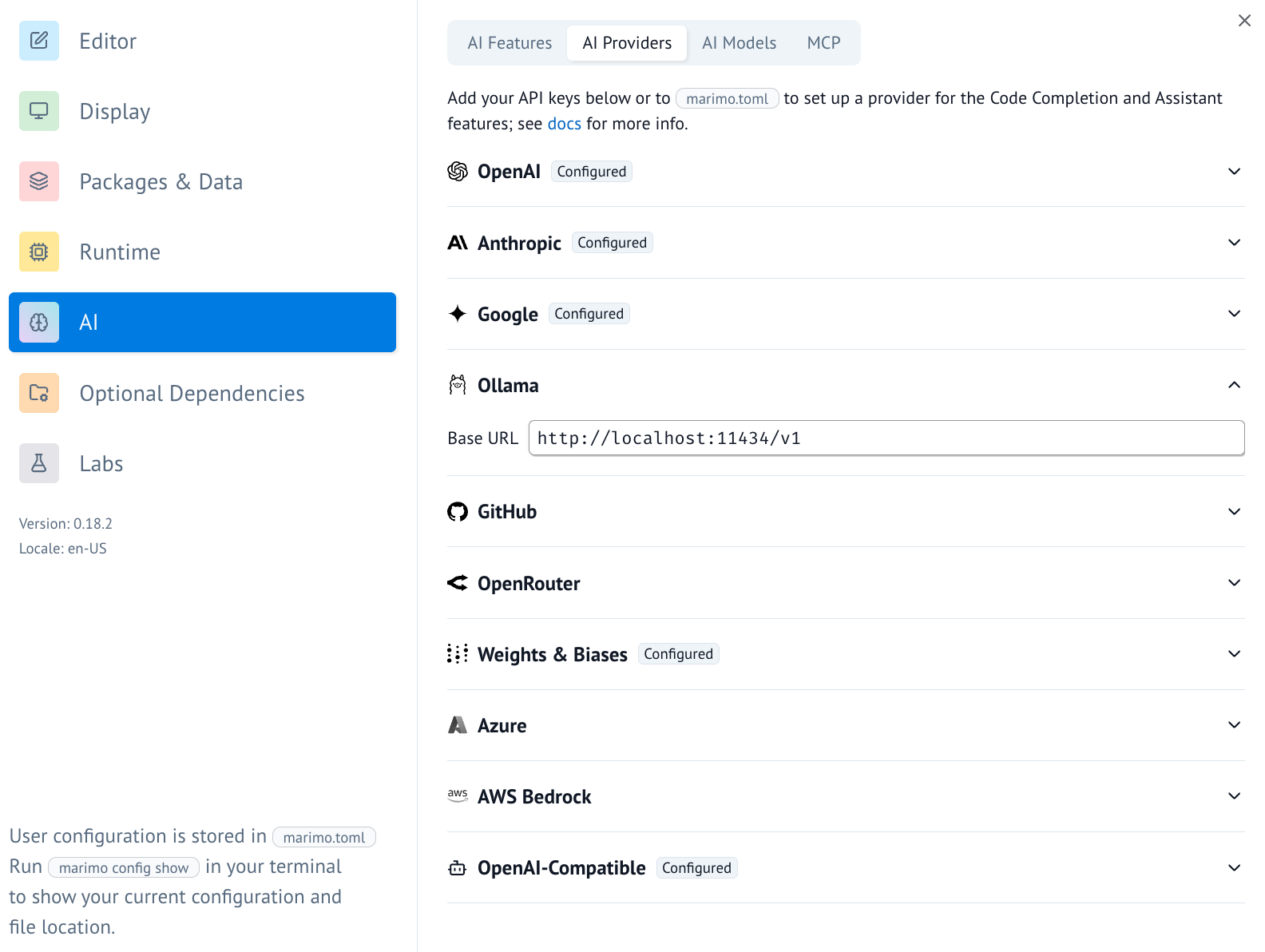
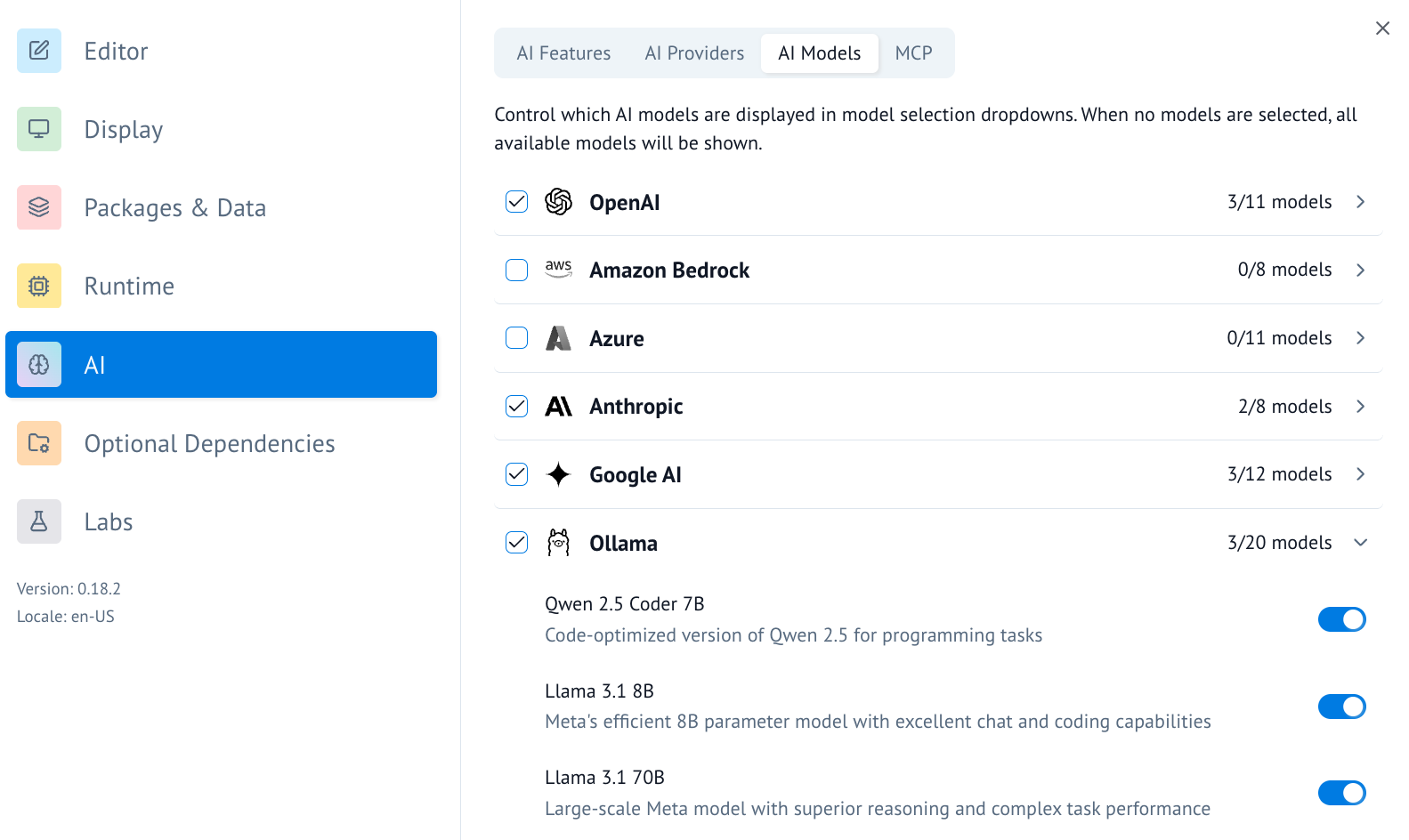
Turn on or off the specific AI models you'd like to access.9
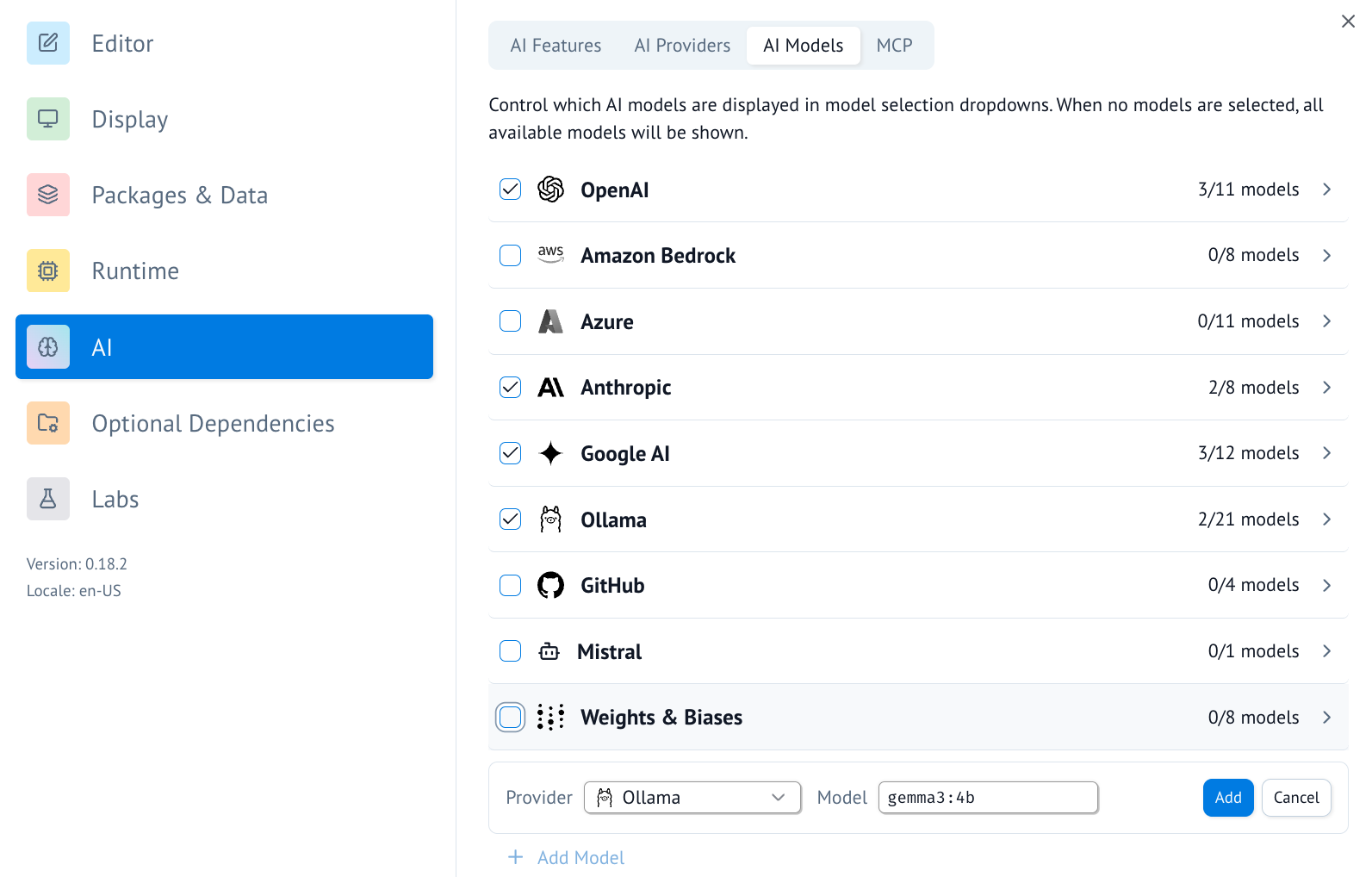
Optional: To add a model to the list of available models, scroll to the bottom and use the UI there.10
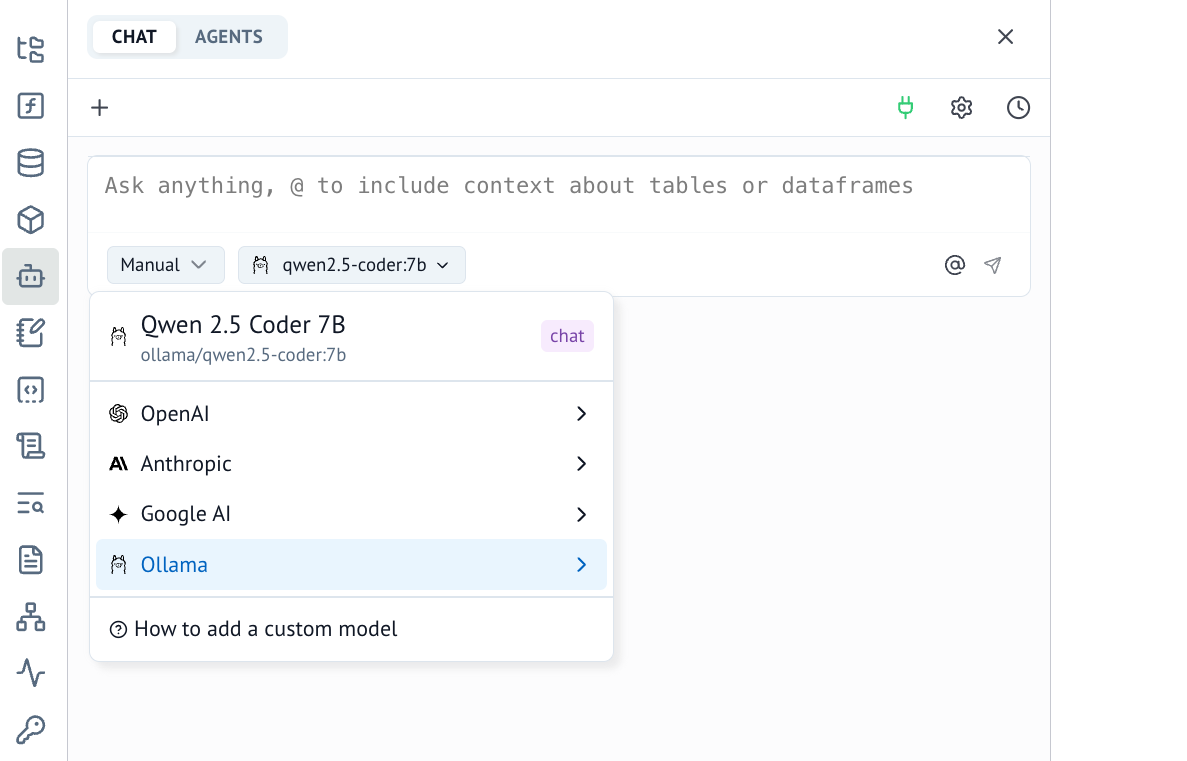
Use Ollama for AI chats in marimo.11
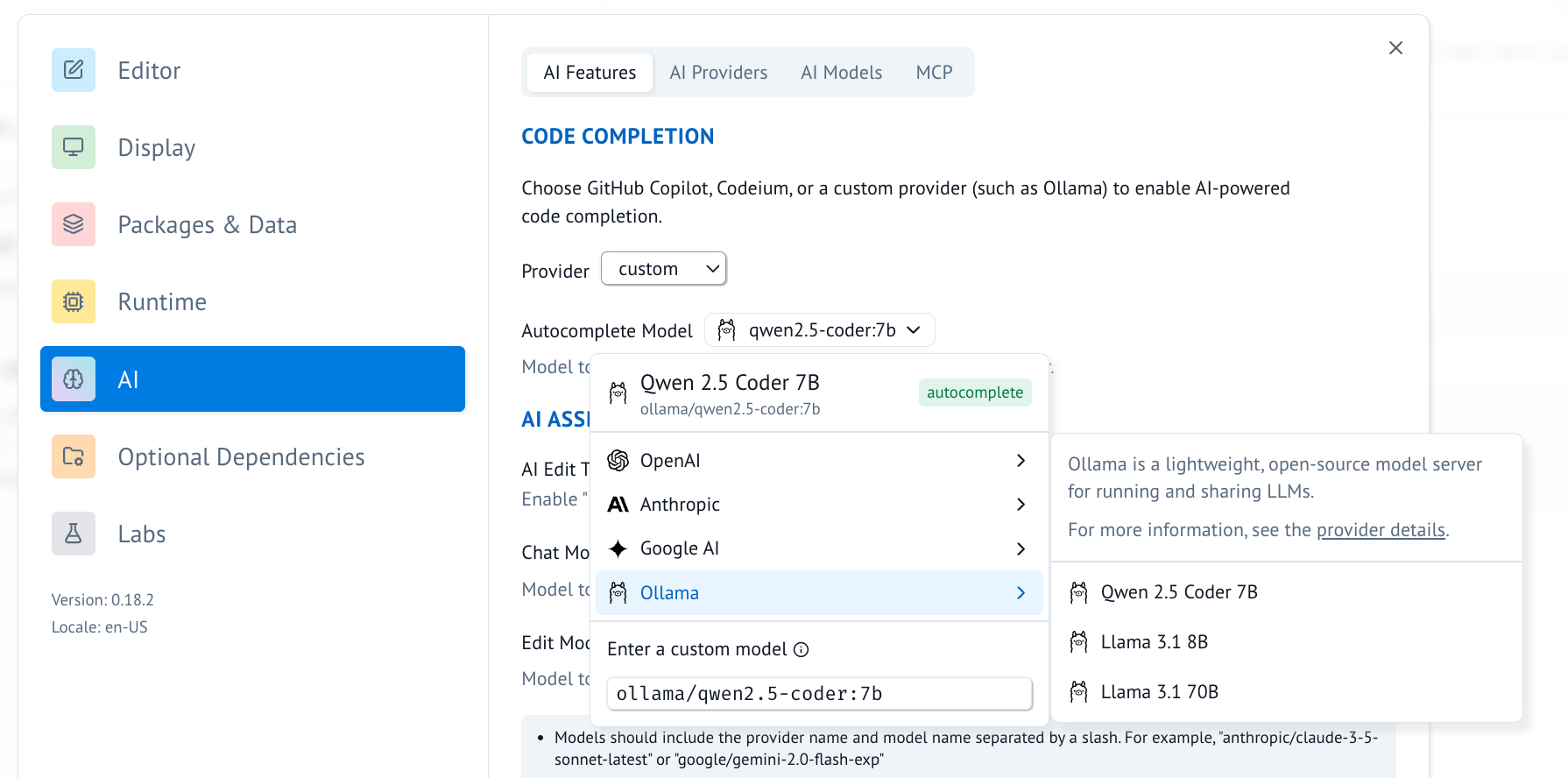
Optional: To use Ollama for inline code completion, configure it in the AI Features tab.13
Connect marimo to ollama.com14
Notes on this page
1 Wording Audit: improved A task title starts with a verb and names the result.
Was:
marimoproc-state-goalAuditor: The title starts with a clear action and names the task.
2 Added Audit: improved Added a goal sentence before the steps, using only what the page already covers.
proc-state-goalAuditor: The opening sentence tells readers what the page helps them do.
3 Wording Audit: improved Prerequisites go under a heading that says so.
Was:
Installproc-prerequisites-firstAuditor: The prerequisite heading makes the install instruction easier to find.
4 Structure Audit: improved The code fence now carries a language label, shell, like the other commands in these docs. The command is unchanged.
Was:
uvx marimo edit --sandbox notebook.pycode-block-languageAuditor: The shell label identifies the code block’s contents without changing the command.
5 Wording Audit: improved The heading now names the job.
Was:
Usage with Ollamatype-task-one-goalAuditor: The heading describes the setup task more clearly than “Usage with Ollama.”
6 Wording Audit: improved The step held three actions, so it is now three steps (1 to 3).
Was:
In marimo, go to the user settings and go to the AI tab. From here you can find and configure Ollama as an AI provider. For local use you would typically point the base url tohttp://localhost:11434/v1.proc-one-action-per-stepAuditor: Splitting the original step makes the setup sequence easier to follow.
7 Wording Audit: improved Second action of the original step 1. The tab name is bold, as the interface shows it.
Was:
go to the AI tabui-bold-labelsui-go-to-pathsAuditor: The separate step and bold tab name help readers locate the setting.
8 Wording Audit: improved Third action of the original step 1, starting with a verb. The URL is unchanged.
Was:
From here you can find and configure Ollama as an AI provider. For local use you would typically point the base url tohttp://localhost:11434/v1.proc-imperativePronounContractionsAuditor: The instruction starts with an action and preserves the local URL guidance.
9 Wording Audit: improved Starts with a verb. 'on/off' is written out as 'on or off'.
Was:
Once the AI provider is set up, you can turn on/off specific AI models you'd like to access.proc-imperativeAuditor: The step starts with an action and replaces the shorthand “on/off” with plain wording.
10 Wording Audit: improved An optional step starts with 'Optional:' and a verb.
Was:
You can also add a model to the list of available models by scrolling to the bottom and using the UI there.proc-condition-and-optionalAuditor: The optional step is clearly labeled and begins with an action.
11 Wording Audit: improved Starts with a verb.
Was:
Once configured, you can now use Ollama for AI chats in marimo.proc-imperativeAuditor: The step starts with a direct action and remains clear in sequence.
12 Accuracy Audit: regression This alt text sat on the AI chat image and was copied from the code completion image. It now describes the step the image sits under. The images are plain Markdown instead of HTML, with the same files.
Was:
Configure code completionimg-alt-requiredAuditor: Replacing the HTML image with Markdown removes the original 50% width setting, changing its displayed size.
13 Wording Audit: improved An optional step, with the tab name in bold. This was the second step numbered 4, and the numbering is now fixed.
Was:
4. Alternatively, you can now use Ollama for inline code completion in marimo. This can be configured in the "AI Features" tab.proc-condition-and-optionalui-bold-labelsAuditor: The step is clearly optional, the tab name is emphasized, and the duplicate numbering is fixed.
14 Wording Audit: improved The heading now names the job.
Was:
Connecting to ollama.comtype-task-one-goalAuditor: The heading names the task more directly.
15 Wording Audit: improved Ollama is capitalized as the product name, with a comma and 'for example'. The model name is unchanged.
Was:
In the ollama model settings add a model that ollama hosts, likegpt-oss:120b.cap-product-names-exactAuditor: The product name is capitalized consistently and the example is introduced more plainly.
16 Wording Audit: improved An instruction instead of an exclamation.
Was:
You can now refer to this model in marimo!Exclamationproc-imperativeAuditor: The instruction is more direct and removes the exclamation mark.
Questions for the owner
X3 Cloud model name form for a signed-in local server. Cloud models says local tools use a
:cloudname, but other pages use a-cloudsuffix, or the bare hosted name afterollama signin. Is the-cloudsuffix still valid alongside:cloud, and which form should every page use for cloud models reached through a local server?Pages: Run cloud models, Authentication, Run Codex CLI with Ollama, Run Droid with Ollama, Use Ollama in marimo
Original
Install
Install marimo. You can use pip or uv for this. You
can also use uv to create a sandboxed environment for marimo by running:
uvx marimo edit --sandbox notebook.py
Usage with Ollama
- In marimo, go to the user settings and go to the AI tab. From here
you can find and configure Ollama as an AI provider. For local use you
would typically point the base url to
http://localhost:11434/v1.
- Once the AI provider is set up, you can turn on/off specific AI models you'd like to access.
- You can also add a model to the list of available models by scrolling to the bottom and using the UI there.
- Once configured, you can now use Ollama for AI chats in marimo.
- Alternatively, you can now use Ollama for inline code completion in marimo. This can be configured in the "AI Features" tab.
Connecting to ollama.com
- Sign in to Ollama's cloud with
ollama signin - In the ollama model settings add a model that ollama hosts, like
gpt-oss:120b. - You can now refer to this model in marimo!
What Changed
The page now has a verb title, a goal sentence and a prerequisite heading. The long first step is split into single-action steps, optional steps are marked, the duplicate step number is fixed, and the images sit inside their steps. One image alt text that described the wrong step is corrected, and the exclamation mark is gone.
Content type: task. The page gives the steps to set up Ollama as an AI provider in marimo.
Automated check, original: 0 errors, 3 warnings, 0 suggestions. Revised: 0 errors, 0 warnings, 0 suggestions.
Independent audit (GPT-6): mixed. The revision is easier to scan: it clarifies the page’s goal, improves headings, and breaks setup into steps. It also drops the images’ 50% width setting, and its change log lists an unresolved question marker without including a question.
Regressions:
- The chat, settings, and code-completion images lose their original 50% width because the revision replaces their HTML sizing with Markdown images. The change is recorded under c12, but also affects the other converted images.
What the revision missed:
- The numbered setup step that says to find Ollama, configure it as a provider, and set a local base URL still combines multiple actions; the standard calls for one action per step.
- The change log lists X3 as an inventory item, but the revised page has no corresponding owner question despite the instruction to flag unresolved questions.
Structure (1)
- 4 The code fence now carries a language label, shell, like the other commands in these docs. The command is unchanged. improved
Wording (13)
- 1 A task title starts with a verb and names the result. improved
- 3 Prerequisites go under a heading that says so. improved
- 5 The heading now names the job. improved
- 6 The step held three actions, so it is now three steps (1 to 3). improved
- 7 Second action of the original step 1. The tab name is bold, as the interface shows it. improved
- 8 Third action of the original step 1, starting with a verb. The URL is unchanged. improved
- 9 Starts with a verb. 'on/off' is written out as 'on or off'. improved
- 10 An optional step starts with 'Optional:' and a verb. improved
- 11 Starts with a verb. improved
- 13 An optional step, with the tab name in bold. This was the second step numbered 4, and the numbering is now fixed. improved
- 14 The heading now names the job. improved
- 15 Ollama is capitalized as the product name, with a comma and 'for example'. The model name is unchanged. improved
- 16 An instruction instead of an exclamation. improved
Accuracy (1)
- 12 This alt text sat on the AI chat image and was copied from the code completion image. It now describes the step the image sits under. The images are plain Markdown instead of HTML, with the same files. regression
Added (1)
- 2 Added a goal sentence before the steps, using only what the page already covers. improved