Revised
This page shows how to add Ollama to XCode, either through your own Ollama or through ollama.com.2
Before you begin3
Add Ollama as a locally hosted provider6
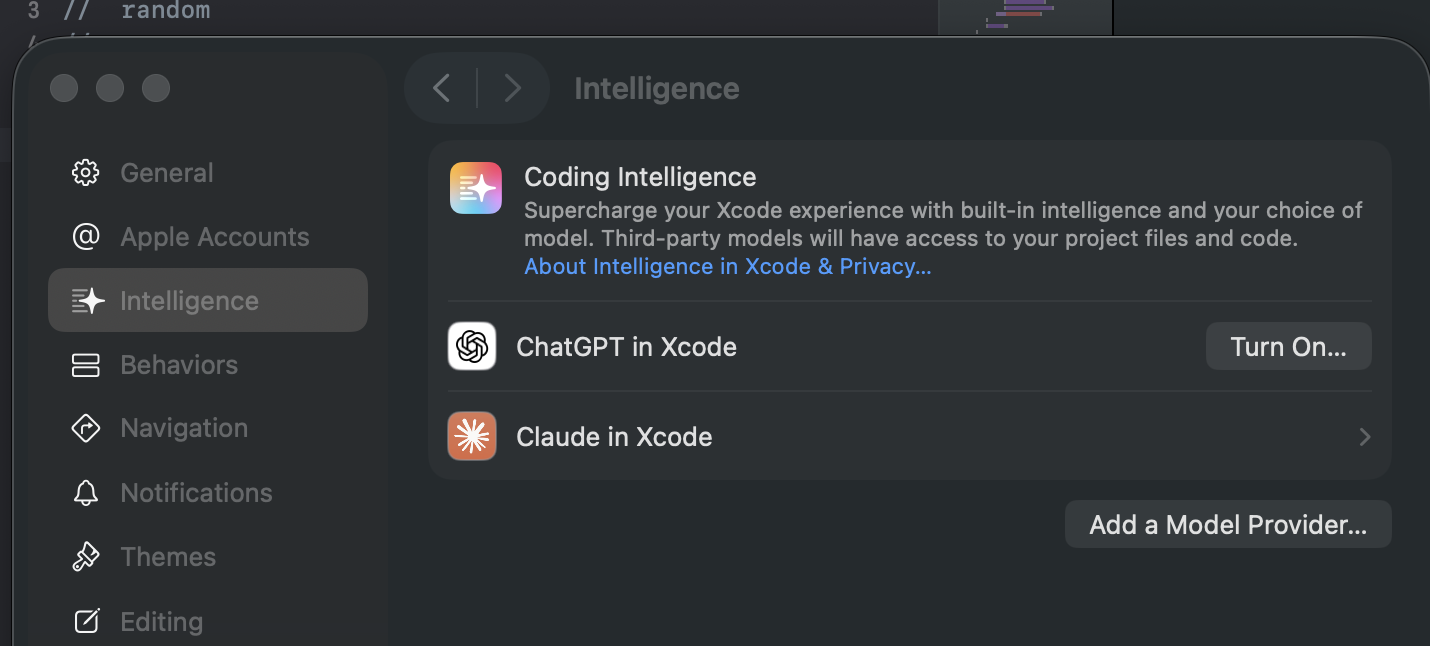
In the top left corner, go to XCode > Settings.7
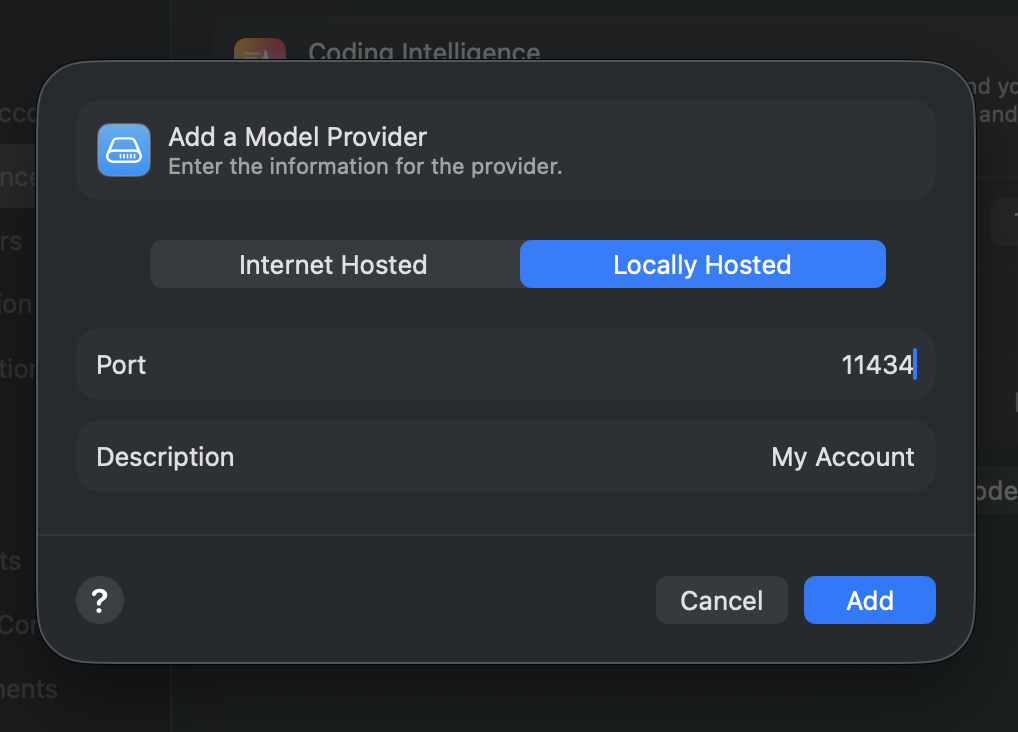
Select Locally Hosted.8
Enter port
11434.9Select Add.10
Select the star icon in the top left corner.11
Select the dropdown.12
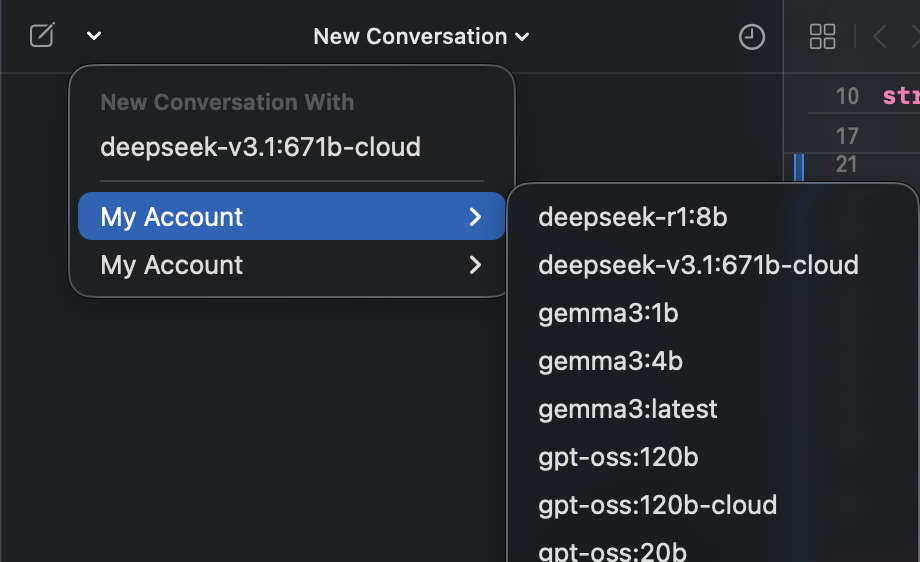
Select My Account.13
Select your desired model.14
Connect to ollama.com directly15
Notes on this page
1 Wording Audit: improved A task title starts with a verb and names the result.
Was:
Xcodeproc-state-goalAuditor: The title starts with an action and tells readers what they will do.
2 Added Audit: improved Added a goal sentence before the steps, using only what the page already covers.
proc-state-goalAuditor: The opening sentence briefly explains the page’s two connection options.
3 Wording Audit: improved Prerequisites go under a heading that says so.
Was:
Installproc-prerequisites-firstAuditor: The new heading makes the install prerequisite easier to find.
4 Structure Audit: regression The note was a prerequisite sitting after the heading, so it moved to the list before the steps and was split in two. 'setup' as a verb is now 'set up'.
Was:
> Note: Ensure Apple Intelligence is setup and the latest XCode version is v26.0proc-prerequisites-firstAuditor: Changing “Ensure Apple Intelligence is setup” to “Set up Apple Intelligence” changes a check into an instruction.
5 Wording Audit: improved 'version 26.0' instead of 'v26.0'. The claim itself is unchanged.
Was:
the latest XCode version is v26.0VersionWordAuditor: Writing “version 26.0” instead of “v26.0” follows the standard’s version-number style without changing the stated number.
6 Wording Audit: improved The heading now names the job.
Was:
Usage with Ollamatype-task-one-goalAuditor: The heading says what readers will do in that section.
7 Wording Audit: improved A menu path is written as one bold path with 'go to'.
Was:
Click XCode in top left corner > Settingsui-go-to-pathsSelectVerbAuditor: The menu path is concise and easier to follow.
8 Wording Audit: improved The step held three actions, so it is now three steps (2 to 4).
Was:
Select Locally Hosted, enter port 11434 and click Addproc-one-action-per-stepSelectVerbAuditor: The selection, port entry, and Add action are separated into individual steps.
9 Wording Audit: improved Second action of the original step 2. The port is in code font because it is a value, not a label.
Was:
enter port 11434proc-one-action-per-stepAuditor: The port is presented as a value and its own step.
10 Wording Audit: improved Third action of the original step 2, with select instead of click.
Was:
click Addproc-one-action-per-stepSelectVerbAuditor: The Add action has its own step.
11 Wording Audit: improved The step held two actions, so it is now two steps (5 and 6).
Was:
Select the star icon on the top left corner and click the dropdownproc-one-action-per-stepSelectVerbAuditor: The star icon and dropdown actions are separated into individual steps.
12 Wording Audit: improved Second action of the original step 3, with select instead of click.
Was:
click the dropdownSelectVerbAuditor: The dropdown action has its own step.
13 Wording Audit: improved The step held two actions, so it is now two steps (7 and 8).
Was:
Click My Account and select your desired modelproc-one-action-per-stepSelectVerbAuditor: Selecting My Account and choosing a model are separated into individual steps.
14 Wording Audit: improved Second action of the original step 4.
Was:
select your desired modelproc-one-action-per-stepAuditor: Choosing a model has its own step.
15 Wording Audit: improved The heading now names the job.
Was:
Connecting to ollama.com directlytype-task-one-goalAuditor: The heading names the task in a direct, scannable way.
16 Wording Audit: improved The step held two actions, so it is now two steps.
Was:
Select Internet Hosted and enter URL ashttps://ollama.comproc-one-action-per-stepAuditor: Selecting Internet Hosted and entering the URL are separated into individual steps.
17 Wording Audit: improved Second action of the original step 2. The URL is unchanged.
Was:
enter URL ashttps://ollama.comproc-one-action-per-stepAuditor: The URL entry has its own step and retains the original URL.
18 Wording Audit: improved The step held two actions, so the second is now its own step, with select instead of click.
Was:
Enter your Ollama API Key and click Addproc-one-action-per-stepSelectVerbAuditor: Entering the API key and selecting Add are separated into individual steps.
Questions for the owner
?1 The page spells the product 'Xcode' in the title and image text but 'XCode' in prose and in the bold menu label; which spelling is correct, and does the menu label match what Xcode shows?
About: “Xcode”
?2 Does 'the latest XCode version is v26.0' mean the reader needs version 26.0 or newer, or exactly 26.0?
About: “the latest XCode version is v26.0”
Original
Install
Install XCode
Usage with Ollama
Note: Ensure Apple Intelligence is setup and the latest XCode version is v26.0
- Click XCode in top left corner > Settings
- Select Locally Hosted, enter port 11434 and click Add
- Select the star icon on the top left corner and click the dropdown
4. Click **My Account** and select your desired model
Connecting to ollama.com directly
- Create an API key from ollama.com
- Select Internet Hosted and enter URL as
https://ollama.com - Enter your Ollama API Key and click Add
What Changed
The page now has a verb title, a goal sentence and a prerequisite list drawn from the old note. Each step holds one action, click became select, and the images sit inside the steps they illustrate. Two questions ask the owner to settle the product spelling and what the version note means; the page's wording is kept for both.
Content type: task. The page gives the steps to add Ollama as a provider in Xcode.
Automated check, original: 0 errors, 6 warnings, 0 suggestions. Revised: 0 errors, 0 warnings, 0 suggestions.
Independent audit (GPT-6): mixed. The revision is easier to scan, and its steps mostly follow the standard’s one-action-per-step guidance. It changes a prerequisite from checking that Apple Intelligence is set up to instructing readers to set it up.
Regressions:
- The prerequisite now tells readers to set up Apple Intelligence, whereas the original told them to ensure it was already set up.
What the revision missed:
- The page still uses both “Xcode” and “XCode” for the product and menu label; the revision appropriately raises this in q1, but the owner must resolve it before the page can use one consistent name.
Structure (1)
- 4 The note was a prerequisite sitting after the heading, so it moved to the list before the steps and was split in two. 'setup' as a verb is now 'set up'. regression
Wording (16)
- 1 A task title starts with a verb and names the result. improved
- 3 Prerequisites go under a heading that says so. improved
- 5 'version 26.0' instead of 'v26.0'. The claim itself is unchanged. improved
- 6 The heading now names the job. improved
- 7 A menu path is written as one bold path with 'go to'. improved
- 8 The step held three actions, so it is now three steps (2 to 4). improved
- 9 Second action of the original step 2. The port is in code font because it is a value, not a label. improved
- 10 Third action of the original step 2, with select instead of click. improved
- 11 The step held two actions, so it is now two steps (5 and 6). improved
- 12 Second action of the original step 3, with select instead of click. improved
- 13 The step held two actions, so it is now two steps (7 and 8). improved
- 14 Second action of the original step 4. improved
- 15 The heading now names the job. improved
- 16 The step held two actions, so it is now two steps. improved
- 17 Second action of the original step 2. The URL is unchanged. improved
- 18 The step held two actions, so the second is now its own step, with select instead of click. improved
Added (1)
- 2 Added a goal sentence before the steps, using only what the page already covers. improved